Showing posts with label Technology. Show all posts

7 point protect from Hackers


      1.    Closed the Wi-Fi and Bluetooth in your smart phone or computers.
Opened Wi-Fi and Bluetooth it’s worked all the times is the easy way for the hacker to hack your smart phone or computers. When you open the Wi-Fi and Bluetooth hackers can know your network that you was connected, and they can cheats your account by your phone or computers.  
When they can connect to your smart phone or computers hackers will hack or give virus to data theft or spying that you don’t know anything. So you should closed your Wi-Fi and Bluetooth when you not used.

      2.    Using Two-Step Authentication
Currently used only password is not enough. Who give email services and many social information have a layer for protect is two-step authentication.
Example when you create Two-step authentication with Google, Twitter, and LinkedIn you need to put security code every log-in. your will receive the code number by text message.  It’s a good strategy to protect from the hackers.

     3.    Create strategy for create security password that easy to remember
For many website have important information such as email, bank…etc. you should create a passphrases that have long character like this example +hisPl@tinumDr@gonBreathesF1er.
For another website you can use the controller security password application (password manager). This application is save all security password so you can create another security password and you don’t need to remember. But used only application that encrypts security password.
LastPass application and Password Safe is an application that popular and its can worked encrypts your password. Please change your password many times in a year.

      4.    Please used HTTPS all websites
Install HTTPS application everywhere tool that develop by pro-privacy Electronic Frontier Foundation.  Its can encrypts all information that browser can input between computer and website. If you see only HTTP in the address bar its mean everybody or hackers can understand you information in address bar.

      5.    Prepare Wi-Fi in your house
2 steps that important thing in prepare installed Wi-Fi in your house. Step 1 is set security password please don’t save default password. Step 2 please selected a type encryption WPA-2. Most of devices select WEP (Wired Equivalent Privacy) or WPA (Wireless Protected Access) is default.

      6.    Don’t hide Wi-Fi in your house
When your Wi-Fi Router ask you about “Hide the SSID?” and your answer is YES so your devices will “actively scan” for network that you try to hide all the times.

      7.    Think 2 times before you buy a network devices that connect to Internet
Are you need “ice box or microware that smart?” Most technology company it’s fast to put all information in internet and customers can seem good functionality and high interesting.


Top 5 New Software

PDF Split and Merge Basic


PDF Split and Merge Basic is the easier application that can split, merge, mix or rotate PDF documents and have super quality. Advantage such as Merge PDF documents Split PDF pages that you are need Rotate PDF documents it's really fast. This application have many language that you can change to your Country and it's have a friendly Interface.
System requirements
          Hard Disk: 15.34MB
          System: Windows
          license: forever
You can download here:
Download: http://www.pdfsam.org/pdfsam-basic/

AdwCleaner is a professional anti-virus to kill browser virus


AdwCleaner is a anti-virus that have a respond to find and delete virus Adware in a Toolbars that no need or many application that not important in our computer. It's just a small application but it's can work well and can deleted many application that not important in your computer. When you kill virus in your computer it's will be better and speed will be up. Best point in this application is can delete Toolbars and Page Hijackers that not important. AdwCleaner can work with Operating System Window XP, Window 7, 8, 8.1 and Sys 32 bit or 64 bit.
System requirements
          Hard Disk: 1.66MB
          System: Windows
          license: forever
You can download here:
Download: https://toolslib.net/downloads/viewdownload/1-adwcleaner/

Folder Lock it's will protect your documents or information


Folder Lock is a protect application that can protect your documents or information and easier to use. You just input your password for lock your folders and drives that you don't want someone seem. This application can lock or Encrypt your information such as Files, Folders, Drives, Pictures or any documents that you want to lock. Not only you can lock your information but you can lock data in your USB too. Folder Lock can lock your data on the Windows, DOS, and safe modes. The best point of this application is lock files, folders and drives like encrypt Files and folders or data backup.
System requirements
          Hard Disk: 9.38MB
          System: Windows
          license: forever
You can download here:
Download: http://www.newsoftwares.net/folderlock/

Glary Utilities the professional application that take care your computer


Glary Utilities is a application that have function to clean documents that not important in your Operating System (OS) and make your OS worked or Boost fast than before. After you are run Glary Utilities already it's show friendly interface and easy to use, you just click only. In the Glary Utilities it's have many functions such as Registry Cleaner, Spyware Remover, Startup Manger and Shortcuts Fixer that make your computer faster.
Specially this application have 44 different language and it's can analyze and test your hold computer.
System requirements
          Hard Disk: 14.6MB
          System: Windows
          license: forever
You can download here:
Download: http://www.glarysoft.com/

Revo Uninstaller Pro the professional application clean application in your PC


Revo Uninstaller Pro is a Tool for delete application that you don't need in your computer. When you run Revo Uninstaller Pro it's will collect all application in your computer to show in the Revo Uninstaller Pro it's easy to seem. Friendly user interface and can delete Registry too. 
System requirements
          Hard Disk: 10.68MB
          System: Windows
          license: forever
You can download here:
Download: http://www.revouninstaller.com/revo_uninstaller_free_download.html


Top 11 Photo Slideshow

Photo Show your photos tell stories, fun, funny sad heart hurts bitterly angry hate. At the same festival or gathering, you are sure to be many sheets you can compile an album or a slideshow too. With slideshow, you can use a lot Software Professional, such as Sony Vegas or Adobe Premiere Pro, Windows Movie Maker even the Windows XP can also do well. Nest recommend programs in the top 10 who specialize in photo slideshow once, including the following:

1. PhotoStage Slideshow Pro


With the simple user interface of PhotoStage Slideshow Pro software, you can use by yourself very easily. You can pan or zoom effects can include audio clip songs rich. Not only you can add or reduce the length of the effect / Transition to the requirements and you can even add brightness and contrast as well as saturation too.

2. MAGIX Photostory 2014 Deluxe


MAGIX Photostory 2014 Deluxe also unbeaten PhotoStage Slideshow Pro. In addition to the various functions such as the Transition, effects, text, sound, you can use this software to create a video, which has up to 4K (4000 pixels).

3. ProShow Gold 6


Besides the images ProShow Gold 6 also allows you to enter the video clip as well. This program offers many different effects and animation that help your slideshow even more lively.

4. PicturesToExe 8


The PicturesToExe 8 is also a better option for making photo slideshow. This program does not limit the number of images that you inserted into the project, and more importantly, with the Deluxe version, you can create Transition effects by itself has more. Not only can you control the opacity, blur, unsharp mask and keyframe animation easily.

5. Photostory Easy


Additionally, you can insert a second audio track, such as music and noise around that makes you feel like are in the program anyway.

6. CyberLink Mediashow 6 Ultra


CyberLink Mediashow 6 Ultra is a application that have many tool for help slideshow to easy to remove noise, shaking stabilizer, adjust brightness, contrast, saturation and remove background noise (audio).

7. DVD Slidershow Builder Deluxe


DVD Slideshow Builder is also comes with crop, rotate tools and special effects like Old Picture, Wood, Inverse, and something more special software that is able to change (switch) between 4: 3 and 16: 9 and can create a 3D video has more.

8. MediaImpression 3 HD


MediaImpression 3 comes with a tool for working with video and photo editing, such as Red-Eye Removal, Dynamic Lighting, and Face beautify. In addition, the program allows you to rate the photos and tag faces and scenes, posing as a convenience in finding specific images you want.

9. Photo MovieTheater


Photo MovieTheater give transition effects only 29 styles and allow you to add background music, caption, illustration, narration, effect...etc. For publish you can upload to youtube or Burn to DVD or Blue-ray Disc.

10. Wow Slider 


Wow slider is a slider this program has a very simple user interface and give many effects styles to all of you.

11. InAlbum Deluxe


The final program is InAlbum. This program has a very simple user interface and the same program brought with him a different kind of background templates 300, with Transition effects 50. However, you can enter the picture only once 1100.

11 point learn to apply yourself to your computer faster

The use of a computer all day is a lot of files that are stored, making a slow computer so that it runs faster experts suggest a few tips so you can learn effectively implemented.


   1.       Avoid placing files on Desktop
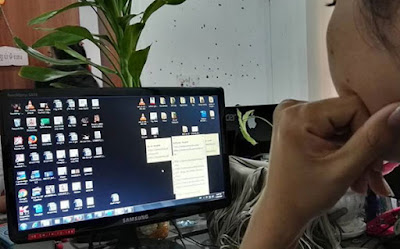
We put too many files on the desktop makes full drive C without knowing it, as we put it up or close it makes RAM (Random Access Memory) that was our temporary data processing, all processing or storing data, making machines our computer slower than normal if the files are large.

   2.       Deleted Temporary File
Click the Windows + R, type% temp%, or  "% tmp%"  or  "temp",  press Enter and then select all the files and delete them.

   3.       Disk Cleanup
By clicking the button Windows + R, type cleanmgr" Choose a drive to clean up.

   4.       Disk Defragmenter
Because when we open multiple applications at the same time, it also can cause a slow computer as well as to avoid click Windows disk cleaning it and drive.

   5.       Deleted document that not important from Prefetch Windows
By clicking Windows + R Prefetch type a file to delete all useless.

   6.       Closed start up application
By clicking Windows + R, type msconfig and then close that we feel is necessary or not.

   7.       Deleted Application that not important
By clicking Windows + R and type "appwiz.cpl" search or click the Windows Control Panel, deleting unused is optional.

   8.       Clean Registry
Used Registry clean up tool to clean your computer.

    9.       Deleted Extension that not important in Browsers  
We put too much Extension Browser also cause your computer slow.
On Chrome, go to Settings, choose the Extension, and then remove it.
On Firefox, go to Add on Select Extension and then remove it.  

   10.   Update Drivers
We update each driver may have expired or backwards, causing the user does not have the same smooth to Driver one of the things we want to update just press the Windows + R and type "devmgmt.msc" press Enter, it will display the Device Manager and click on the Driver and Mouse pane and click Update Driver and choose Searching Automatically.

   11.   Full scan virus
You must scan virus in your computer virus or malware can also cause slow computer.


Your bad habits 6 makes driving a broken car without knowing it

The driver alone is not enough yet, but by the need to find out how to care and to study the factors causing further damage. The following is the bad habits of a small number of drivers which can cause damage without knowing it:

1. Not use the handbrake


Not that when parking in the slope or flat parking area without using the handbrake is it provides all the pressure to box number. Something unique in the box that can balance the car, a small needle is the so-called " parking pawl ". Like this, through the use of the parking brake when it will help ease the pressure of the dialog box and can add life numbers have been even longer.

2. Not yet pleasantly stopped immediately switch


Inside the box is a lot like this when change without properly stopped seems like a job as braking control which provides a huge pressure to small systems. Doing this can also cause damage shaft, a one-minute power transmission to the wheels.

3. Riding downhill and used brakes


Riding downhill with brakes may be the safest method, but riding on the road distance may cause skin hv_rom overheating and damage quality. This should ride with no brakes occasionally if.

4. Washing machine, a hydraulic car

Some car wash if the use of force can make some parts of the affected like a protective membrane.

5. Regardless of the vehicle

Sometimes the sound emitted by a car lets you know that the car is still something so when the driver should take a listen to the sound of cars, rather than listening to music or radio.

6. The sting of gasoline fell to the bottom remain forward


Ray Sparrow expert, a mechanic, said that if the car out of fuel, and still farther The problem will occur for the engine. For vehicles with engine diesel consumption problems may occur on the worship of the vehicle with damage because of the rich in the air rather than diesel.

For vehicles with engine using gasoline is slightly better than diesel. But there's a point where you should worry about is if you have already filled fuel also remains can be started. This can come from a clogged air. Air contained in the fuel tank of gasoline cannot drain into the machine, which is to help repair and it can cost more than the price of gasoline, which you save.


Four reason that Android's users should avoid

If you intend to use, or just use a new phone, you always hear the words introduced much of what should be done first, but seemed to have no instructions about what should not do that.


Samsung is killing it in the marketplace, outselling not just other Android OEMs, but even beating Apple at various times. You’ve probably heard the banter about Samsung forking Android and taking Google out of the equation, but that’s not the real problem Google is facing. Samsung is selling so many Android phones that Google could simply lose control. Samsung doesn’t have to fork Android — Google no longer has any choice but to do Samsung’s bidding.


The following guidelines should not do four things for you just use the first Android phone:

1. Should not buy an Android phone without updating the operating system


Said the updated operating system, it is like a big negative for the Android phone. This is also because there are some phones hardly get a new operating system updates at all, although it a new series of mobile phones that have issued. But there are also some of the phone companies still receive updates new realities, such as Samsung, Sony, HTC or Google.

2. Shouldn't be installed an application without prior research

Root the phone is a big consideration because it can cause a whole new phone's user If there is a random error. For that there are several methods to fix the phone, but should avoid root better.

3. Should not use the phone plug-in battery


Before plug battery phones are popular for off the phone to save Saving the battery, but the Android system is currently capable enough can make managing these mobile applications without batch plug-in installed.

4. Root should not call unless you are sure that they are doing


Root the phone is a big consideration because it can cause a whole new phone's user If there is a random error. For that there are several methods to fix the phone, but should avoid root better.

12 popular Cloud Storage Service

Due to the use of mobile phones is increasing every day make use of an online storage service Cloud Storage more popular.


Cloud Storage 10 gained fame from users around the world who use the telephone assistance for users who need more space easily the storage of data on the Internet.

1. DropBox
               No doubt Dropbox cloud storage best in the world that can use every platform. It's simple to use 2 GB of storage space for free.

2. Google Drive
               Google's service, which offers 15 GB of storage for free. Apart from the features storage services also share data back and forth more.

3. Box
               Box is a data storage service online the most popular for those doing business with the size of 10 GB for use. What is the disadvantage of this service, users can not upload data that is larger than 250 MB, which is a problem for you to load video or large data.

4. Mega
               With access to a huge storage space of 50 GB free is something that many users prefer services of Mega.

5. Adrive
               Adrive also interesting that provides data storage up to 50 GB for free.

6. Bitcasa
               Bitcasa cloud storage a popular, users can get 20 GB of storage space for free.

7. Onedrive
               Microsoft's service that provides data storage, 15 GB free for users. Users can get free add another 8GB by simply introducing friends to use and sync photos from your camera album to OneDrive.

8. SpiderOak
               SpiderOak is a Clould Storage service that you can use 2 GB for free and can add up to 10 GB when who advised other friends.

9. Tencent Weiyun
               Tencent company, China's largest Internet service that provides data storage services online to consumers until 10 TB (10240 GB) free.

10. Qihoo 360 Yunpan (Cloud Drive)
               Qihoo 360 also valuable Internet company has a reputation of China, services Cloud Storage.

11. Mediafire
               Mediafire is a cloud storage that provides data storage up to 50 GB for free. This storage is very good for user that want to store media.

12. SkypeDrive
              SkypeDrive is a cloud storage that provides data storage up to 2 GB for free.   

11 Things you didn't know your iphone headphones could do

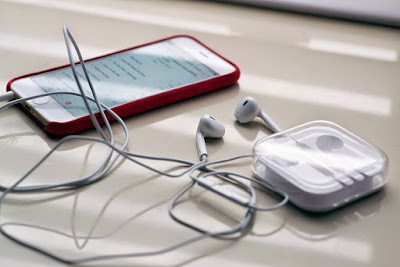
IPhone has a lot of opportunities that could be useful beyond what you think. Not only for headphone listening, but the IPhone headphone can do many things.


Every items come to the pair this to know your devices headphone with the cable to doing a lots more than you think. 

1.  Single Click
               If you press a center button one your play song from your music app or another music singing app.

2. Click second time
             When you press one more time it's mean pause the song.

3. Double Click
               When you press the center button twice to skip to the next song

4. Triple Click (Press three times)
               When you press the center button three times go back to the start song or the previous song

 5. Double Click + Hold
               When you press Double Click + Hold center button on the left click to fast forward to the song

6. Triple Click + Hold
               When you press Triple click + Hold on the left click to rewind the song

7. Get a phone call (press the center button)
               Now when you get a phone call press the center button one to answer this headphone have microphone so you can used them to talk.

8. Get another call (press the center button one more time)
               If you see another call press the center button one more to switch a new call and first call is hold and working with the new call

9. Ignore a second incoming call  
               If you want to ignore a second incoming call Hold the center button

10. What can I help you with?
               In the home screen press the center button

11. You can take a photo 
               You can take a photo by camera app by pressing on the volume button.